


Use /insights to Improve Your Claude Code Setup
Photo by Markus Spiske on Unsplash
I've been using Claude Code pretty heavily lately — 300+ sessions over the past few weeks across work, side projects, and a bunch of daily workflow automation I've built on top of it. At some point you start to develop a feel for where things are smooth and where they're not, but it's mostly vibes. You correct Claude on the same thing for the third time and think "I should really write that down somewhere" and then you don't.
Turns out there's a command for that. /insights analyzes your last 30 days of Claude Code sessions and generates an HTML report breaking down how you've been using it — what's working, where you're losing time, and what you should change. I ran it today and it was genuinely more useful than I expected, so I figured I'd walk through what it actually looks like.
Running it
There's no setup. You just type /insights in Claude Code and wait a couple minutes. It crunches through your session history and drops a report at ~/.claude/usage-data/report.html. Open it in a browser and you're looking at something like this:
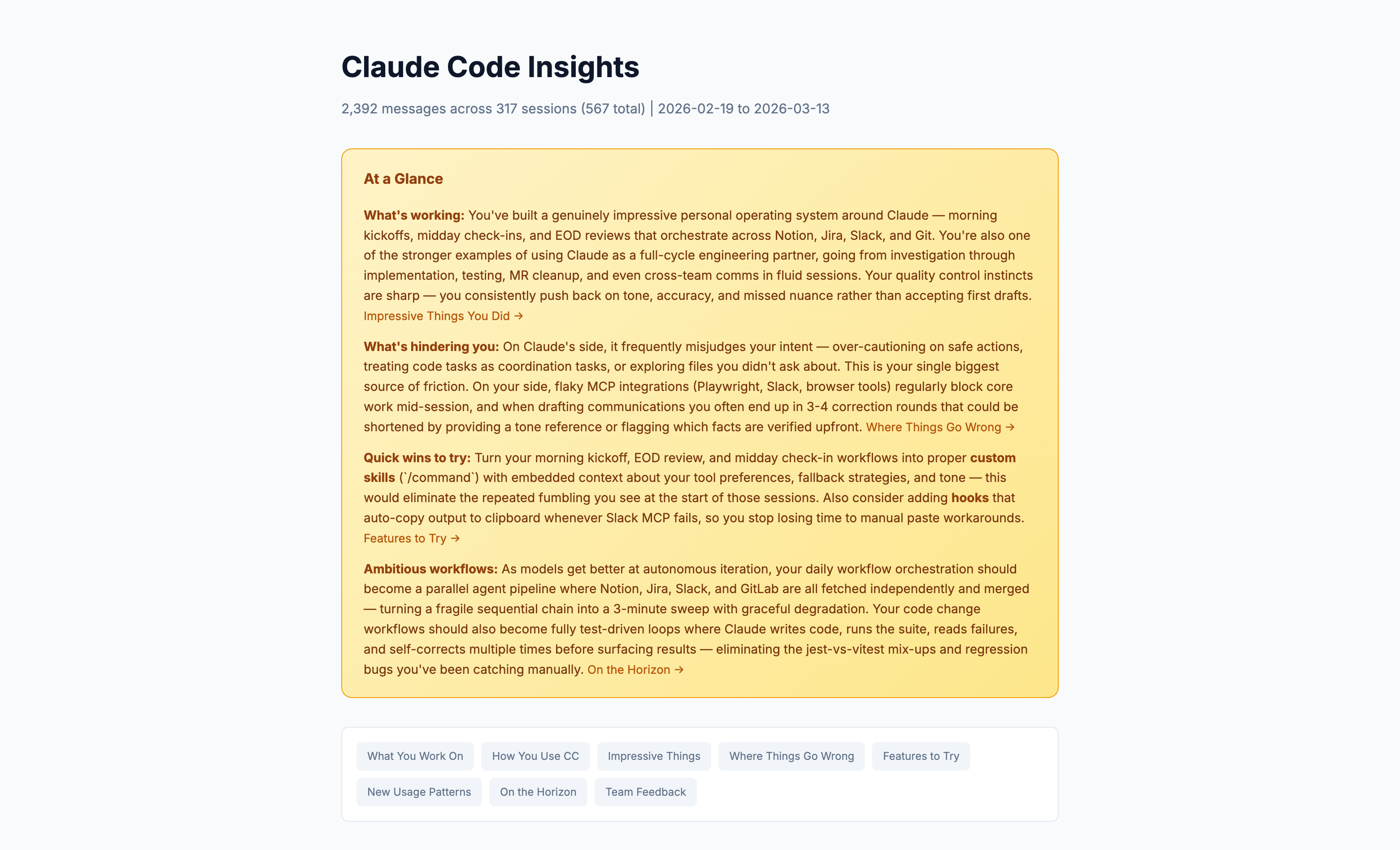
The top section is an "At a Glance" overview — what's working well, what's costing you time, quick wins to try, and some longer-term workflow ideas. Below that it breaks into more detailed sections for each area.
What I learned about my friction
The report identified that my single biggest source of friction was Claude misjudging my intent. Over-cautioning on actions I'd already told it were safe, treating code tasks as coordination tasks, exploring files I didn't ask about. I knew this was happening — I'd corrected it plenty of times — but I didn't realize how consistent the pattern was until I saw it quantified across three weeks of sessions. Nearly half of all my friction events fell into this one category.
The other thing it caught was my communication drafting workflow. I use Claude to draft Slack messages, LinkedIn posts, and other stuff pretty regularly, and the report flagged that I was averaging 3-4 rounds of tone corrections per draft. It suggested I put my writing preferences directly in my CLAUDE.md so Claude gets the voice right on the first pass. Obvious in hindsight, but I'd never thought to actually do it.
It also called out tool failures — Slack MCP dropping mid-session, browser automation tools not connecting — as a recurring blocker. Not something I can fix with a config change, but useful to see how much time I was actually losing to it.
The CLAUDE.md suggestions
This is the most practical part of the whole report. It watches what you keep correcting Claude on and generates copy-paste rules you can drop straight into your CLAUDE.md.
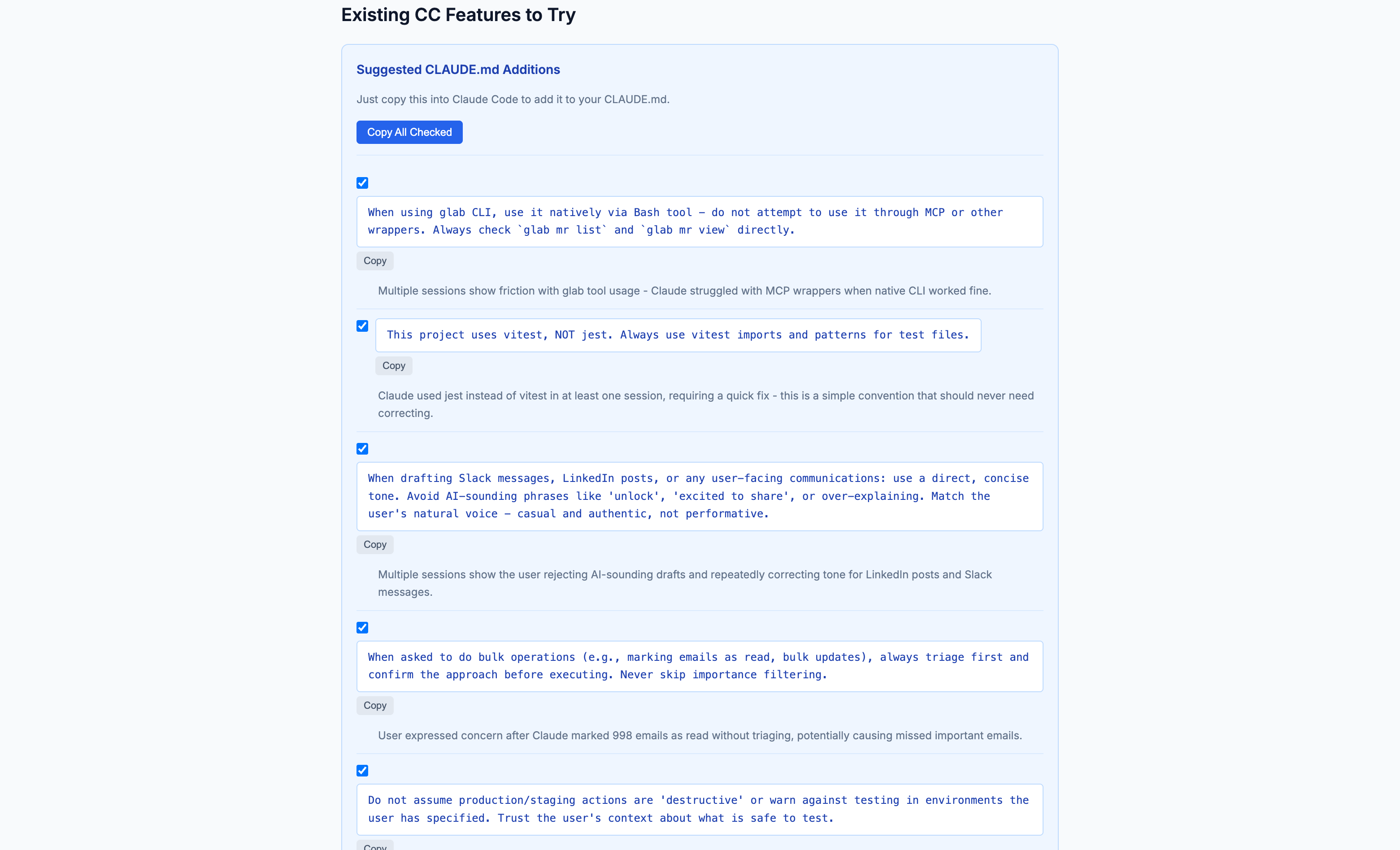
Mine included things like:
- "This project uses vitest, NOT jest" — Claude had used the wrong test runner at least once and I'd corrected it, but never wrote it down
- "Don't assume production/staging actions are destructive when the user has told you it's safe" — this one was a direct response to a session where Claude refused to test an app swap in production because it thought it was dangerous. It wasn't.
- "When drafting communications, use a direct, concise tone. Avoid AI-sounding phrases like 'unlock', 'excited to share', or over-explaining" — the tone correction pattern it had flagged earlier, turned into an actual rule
- "When asked to do bulk operations, always triage first and confirm before executing" — this one came from a session where Claude helpfully marked 998 emails as read without checking any of them. Efficient? Yes. Smart? Debatable.
Each suggestion comes with a "why" explaining which sessions it came from, plus a copy button. I added most of them to my setup in about five minutes.
What changed
The difference was pretty immediate. The next few sessions after updating my CLAUDE.md were noticeably smoother — Claude stopped second-guessing me on production testing, got the tone closer on first drafts, and used the right test framework without me having to correct it. None of these are individually a big deal, but they compound. Every correction you don't have to make is a context switch you don't have to do.
The bigger takeaway for me was that there's a whole category of setup improvements that are hard to discover on your own. You don't notice the patterns in your own friction because each individual instance feels minor and different. The report connects the dots across sessions in a way that's hard to do manually.
Worth running
If you've been using Claude Code for a few weeks, just run /insights. It takes a couple minutes, runs entirely locally, and you'll probably find at least a few things to add to your CLAUDE.md that you didn't know you needed. I plan on running it every couple weeks to keep things dialed in — five minutes of setup that saves you friction across every future session.
The whole report is local HTML, so there's nothing to configure and nothing leaves your machine. Give it a shot and see what it finds.